
HomeProductsMSSP++

MSSP++: IT, MSP and MSSP services under one contract

MSSP++ works as an extension of your IT staff. One team runs your devices, network and cloud, watches them from our security operations center, and trains your people to stay safe online.

MSSP++ datasheetPDF, 2 pages

An MSSP++ dashboard tracks devices, tickets, patches and alerts and shows 98.6 percent of endpoints protected.

What is included.

Choose the services you need now. Everything runs through the same team and the same SOC.

01Managed IT and support
Systems, infrastructure, cloud and end-user devices, with optimized IT support for everyday requests.
02Secure cloud adoption
Secure cloud templates and integration for moving off legacy systems safely.
03Endpoint and network security
Protection for networks, infrastructure and every device your employees and contractors use.
04Centralized SOC monitoring
Your environment onboarded to our security operations center, with incident recovery and stronger controls.
05Security awareness training
Tailored education for employees and consultants, so behavior changes along with technology.
06Web filtering and monitoring
Cloud-native web filtering and online activity monitoring for student safety.

Why the plus plus.

A managed service provider keeps systems running. A managed security service provider watches for attacks. MSSP++ does both, and adds the part most providers skip: changing how people behave online.

  • An extension of your IT staff, not a replacement
  • Legacy technology modernized on a plan you can fund
  • Security behavior change built into the service
  • Cloud integration done securely from the start

The console your requests run through.

Every request, alert and device you hand us lives in Culper-I, the Early Warning System our analysts and engineers work from, so the person fixing a laptop can see the alert it raised. Your team gets its own login.

Tickets
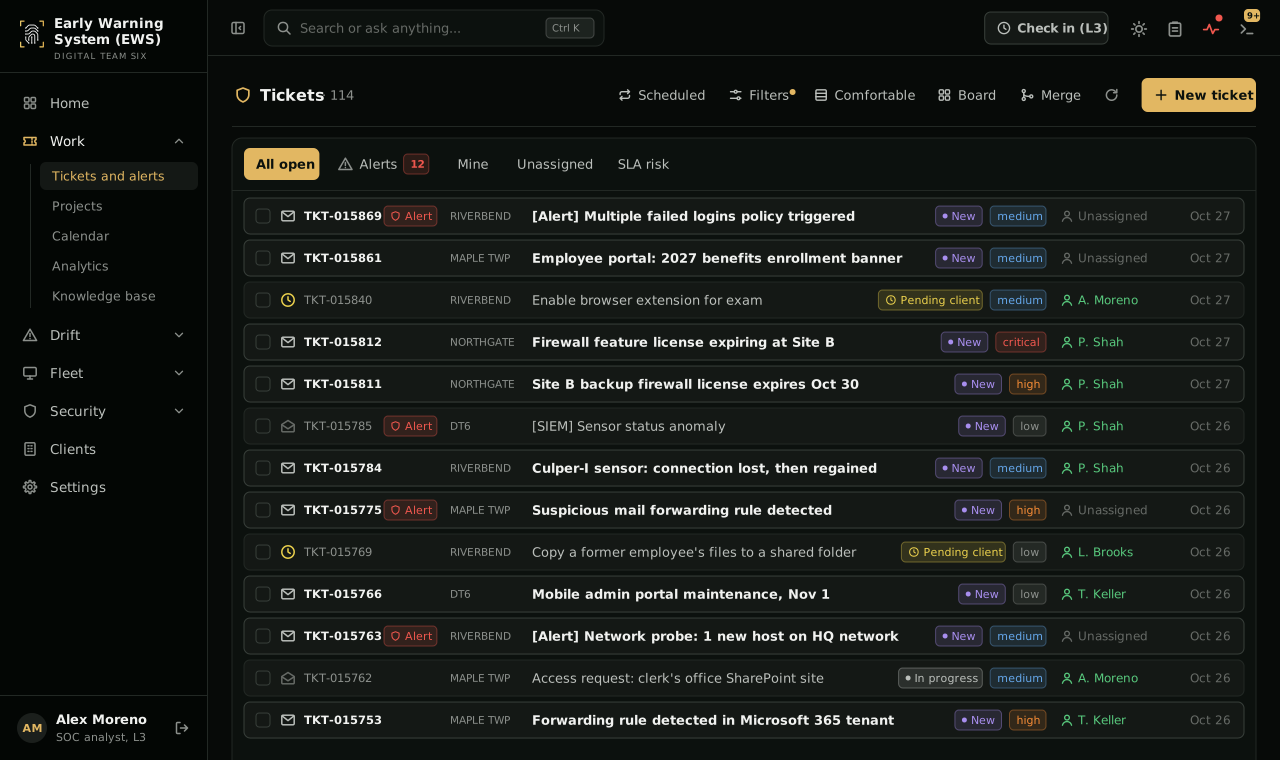
The tickets and alerts queue with 114 open items. Each row shows the ticket number, client, subject, status, priority, assigned engineer and date, such as a high-priority alert for a suspicious mail forwarding rule and a Culper-I sensor that lost and regained its connection.
Tickets and alerts. Requests from your staff and alerts from the SOC share one queue, graded by priority and tracked against your service levels.
Open full size: Tickets

A ticket

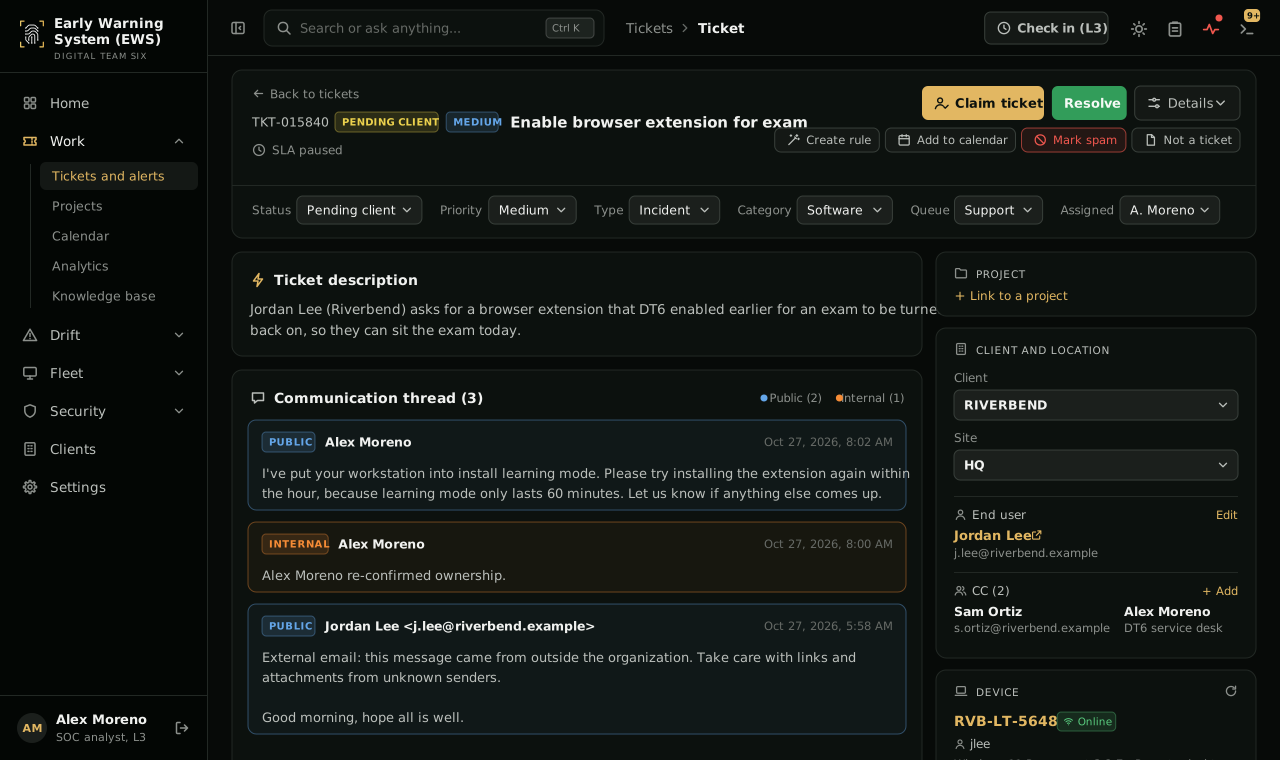
A ticket to re-enable a browser extension for an exam, pending the client. The thread shows the engineer's public reply, an internal note and the original email. Side panels show the client and site, the end user, and their laptop, which is online.
One ticket, the whole picture. The thread with your staff, internal notes, the client and site, the person asking and the device they are on, together on one screen.
Open full size: A ticket

Ask Six

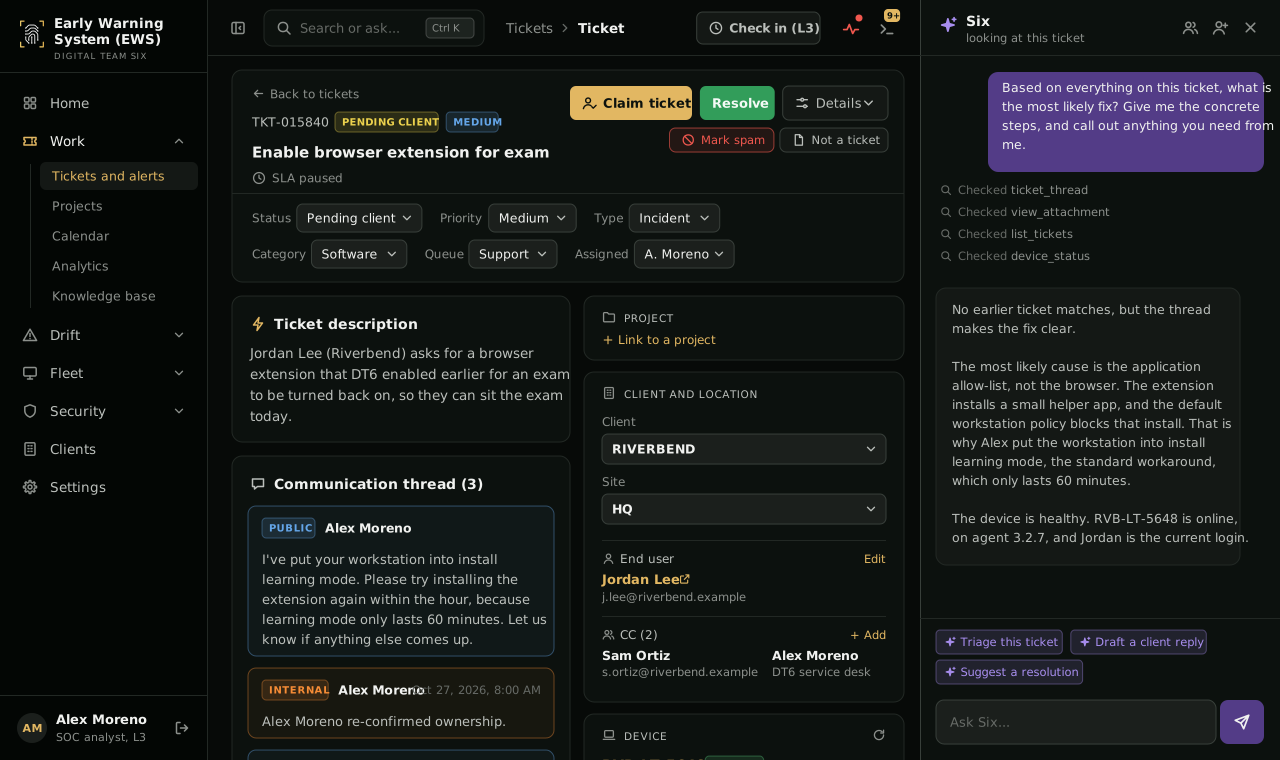
Six, Culper-I's AI assistant, open beside the same ticket. Asked for the most likely fix, it checks the thread, the attachments, past tickets and the device, then answers that the application allow-list is blocking the extension's helper app. It offers to triage the ticket, draft a client reply or suggest a resolution.
Ask Six. Culper-I’s AI reads the ticket, the thread and past tickets, proposes the most likely fix and drafts the reply. An engineer decides what happens next.
Open full size: Ask Six

Devices

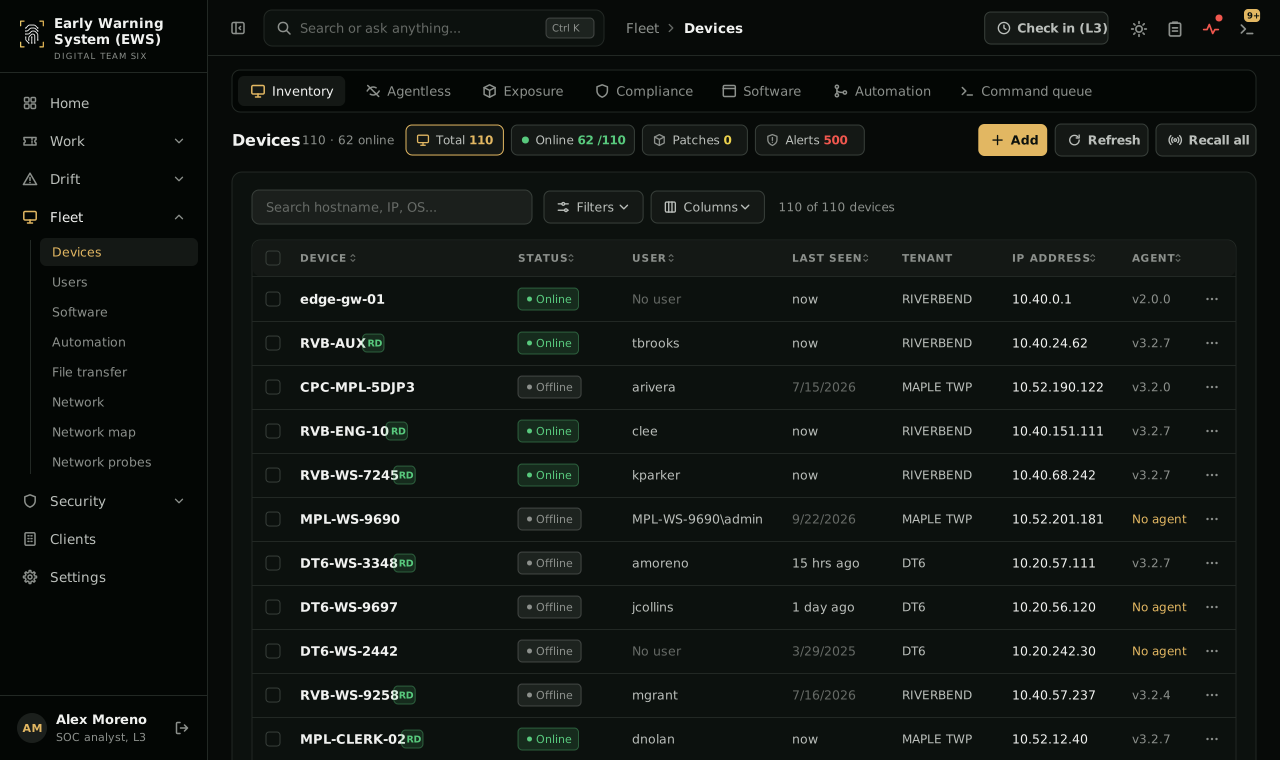
The device inventory: 110 devices, 62 online. A table lists each device with its status, user, last seen time, client, IP address and agent version, and flags devices with no agent.
Device inventory. Every managed device with its status, user, last check-in, network address and agent version, including the ones that have gone quiet.
Open full size: Devices

Device health

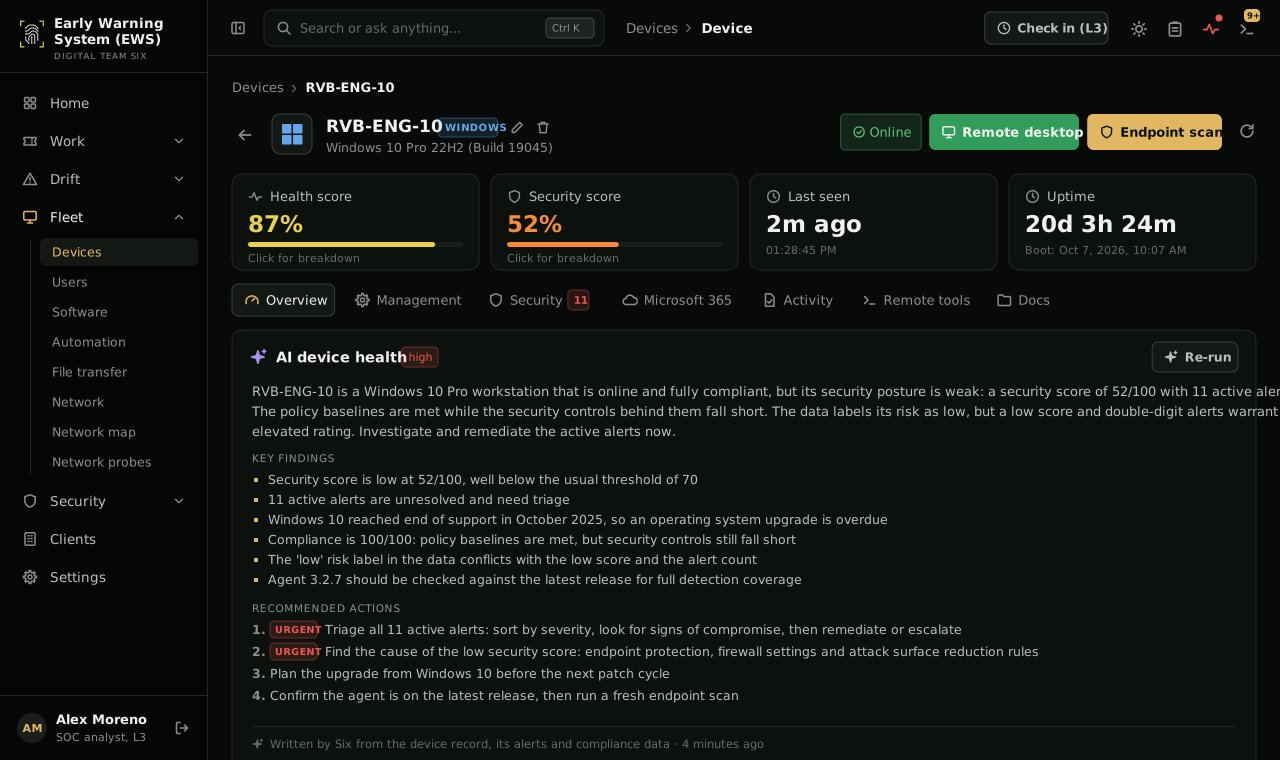
The page for an engineering workstation running Windows 10: health score 87 percent, security score 52 percent, up for 20 days. The AI device health summary rates the risk high, lists findings such as 11 unresolved alerts and an operating system past end of support, and recommends triaging the alerts first.
Device health. Health and security scores for each machine, with a plain-language summary from Six of what is wrong and what to do first.
Open full size: Device health

Sample data. Clients, people, devices and addresses are illustrative.

Built for schools and local government.

Schools and districts

K-12 and higher education

  • Web filtering and activity monitoring for student safety
  • Support for CIPA, COPPA and FERPA requirements
  • Training for staff, faculty and administrators
SLED solutions

Local government

Municipalities, agencies and public works departments

  • Help assessing and meeting NJ MEL cyber requirements
  • Remote work secured for staff, vendors and contractors
  • Continuity planning for the systems residents rely on
Public sector solutions

How onboarding works.

  1. Assess

    Review your systems, devices, accounts and current support arrangements.

  2. Stabilize

    Fix the urgent issues and take over day-to-day support.

  3. Secure

    Roll out endpoint, network and cloud protection and connect everything to the SOC.

  4. Improve

    Modernize legacy systems and train your people on a steady schedule.

The result: insurance and school compliance.

Managed IT and security under one contract, built around what your insurer and your regulators ask for.

Insurance

Help assessing and meeting the NJ MEL Deductible Reduction Groups and your insurer’s requirements.

Schools

Web filtering, activity monitoring and support for CIPA, COPPA and FERPA requirements.

Questions about MSSP++.

Yes, if you want to. MSSP++ is designed as an extension of your IT team, and many clients keep an internal lead who works with us.

Yes. Start with SOC monitoring and training, and add managed IT later.

No. We integrate with what you have and only replace tools when it clearly helps.

One contract for IT and security.

Start with an assessment of your systems, accounts and support arrangements, and a plan you can fund.